Tutorial 2 Niche query benchmark on DLPFC dataset
To systematically benchmark niche querying performance on real datasets with a substantial number of samples, we used the Human Dorsolateral Prefrontal Cortex32 (DLPFC) dataset. This dataset consists of 12 well-annotated spatial transcriptomic samples with a total of types of layers.
[ ]:
import os
os.environ['CUDA_VISIBLE_DEVICES'] = '0'
import sys
import logging
import warnings
import numpy as np
import scanpy as sc
import matplotlib.pyplot as plt
[ ]:
import sys, os
import quest.utils as utils
from quest.trainer import QueSTTrainer
[ ]:
warnings.filterwarnings("ignore")
logger = logging.getLogger(__name__)
logging.basicConfig(level=logging.WARNING)
Read and explore the data
[ ]:
data_path = "../data/DLPFC"
model_path = "../results/DLPFC/model/quest_model.pth"
sample_ids = ["151507", "151508", "151509", "151510", "151669", "151670",
              "151671", "151672", "151673", "151674", "151675", "151676"]
adata_list = [sc.read_h5ad(f"{data_path}/{data_id}.h5ad") for data_id in sample_ids]
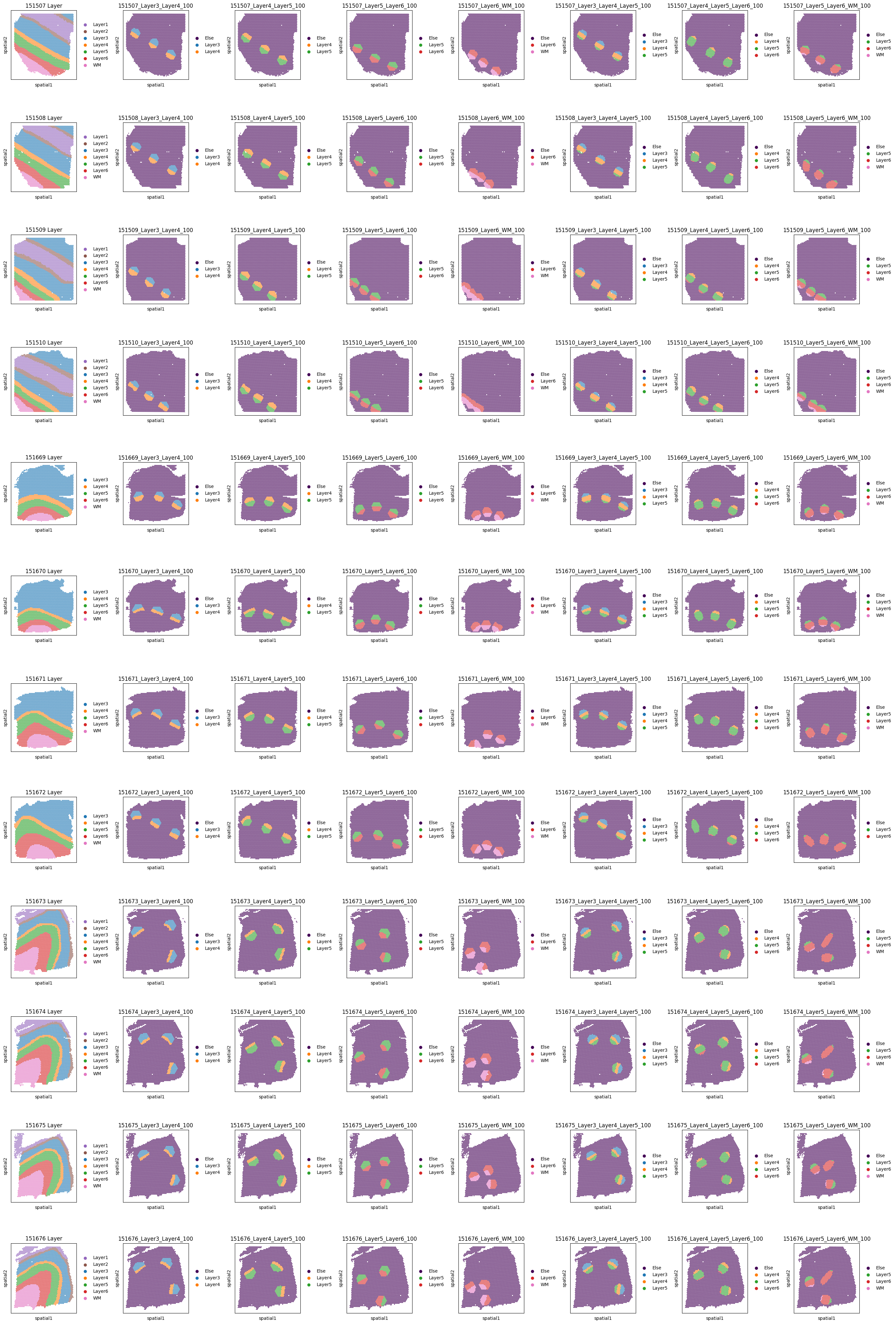
To include various layer composition scenarios, we defined seven niche types: four composed of two layers, and the rest three composed of three layers. For each niche type, we randomly sampled three replicates in each sample.
[ ]:
niche_groups = ["Layer3_Layer4_100", "Layer4_Layer5_100", "Layer5_Layer6_100", "Layer6_WM_100",
                "Layer3_Layer4_Layer5_100", "Layer4_Layer5_Layer6_100", "Layer5_Layer6_WM_100"]
niche_replicates = [0, 1, 2]
Here we show all the query niches and ground truth layer annotation.
[ ]:
nrows, ncols = 12, 8
fig, axs = plt.subplots(nrows, ncols, figsize=(28, 42))  # figsize is (col, row)
axs = axs.flatten()
for i, sample_name in enumerate(sample_ids):
    sc.pl.spatial(adata_list[i], color="Layer", ax=axs[i * ncols], spot_size=5, show=False, palette=utils.color_dlpfc, title=f"{sample_ids[i]} Layer")
    axs[i * ncols].invert_yaxis()
    for j, niche_group in enumerate(niche_groups):
        title = f"{sample_name}_{niche_group}"
        sc.pl.spatial(adata_list[i], color=f'{niche_group}_layer', spot_size=5, ax=axs[i * ncols + j + 1], show=False, palette=utils.color_dlpfc, title=title)
        axs[i * ncols + j + 1].invert_yaxis()
fig.tight_layout()
fig.show()
Configure niche query task
Here we use the niche named Layer5_Layer6_100_replicate=0 on sample 151670 as an example.
[ ]:
dataset = "DLPFC"
query_sample_id = "151670"
query_niches = ['Layer5_Layer6_100_replicate=0_niche']
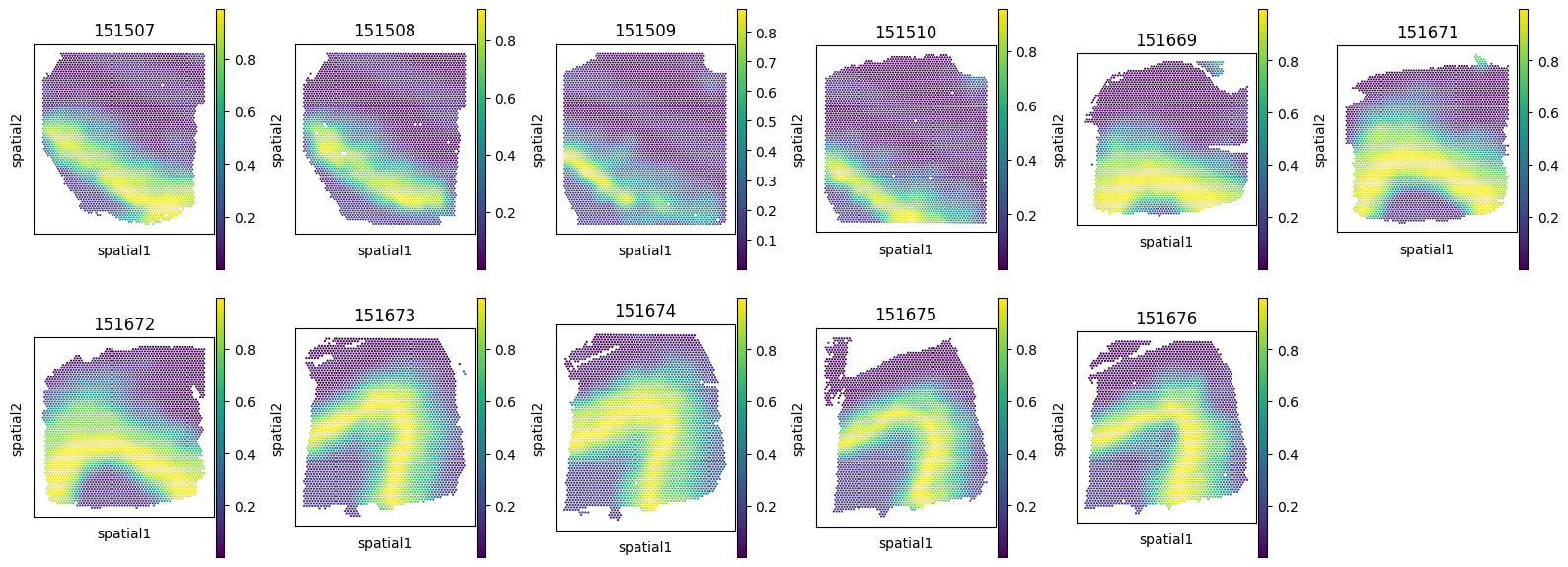
We also show the Region Matching Score of this query niche on the other referene samples. We use this score as a ground truth niche similarity measurement.
[ ]:
adata_ref_list = [adata for adata in adata_list if adata.uns['library_id'] != query_sample_id]
ref_id_list = [adata.uns['library_id'] for adata in adata_ref_list]
adata_plot = adata_list[sample_ids.index("151673")]
fig, axes = plt.subplots(ncols=6, nrows=2, figsize=(16, 6))
axes = axes.flatten()
for i, adata_ref in enumerate(adata_ref_list):
    sc.pl.spatial(adata_ref, color=f"{query_sample_id}_Layer5_Layer6_100_replicate=0_region_matching_score",
                  spot_size=5, show=False, title=f"{adata_ref.uns['library_id']}", ax=axes[i])
    axes[i].invert_yaxis()
axes[11].axis('off')
fig.suptitle(f"Region Matching Score of Query niche: {query_niches[0]} on {query_sample_id}")
fig.tight_layout()
fig.show()

Set up QueST Trainer
[ ]:
trainer = QueSTTrainer(dataset=dataset, data_path=data_path, sample_ids=sample_ids, adata_list=adata_list,
                       query_niches=query_niches, query_sample_id=query_sample_id,
                       model_path=model_path,
                       epochs=20, save_model=True, hvg=4000, min_count=0, normalize=True, seed=2024)
Train QueST model and perform niche query
We also provided pretrained QueST model checkpoint weights at https://cloud.tsinghua.edu.cn/d/d0497bcee4e34a76aaf8/. To skip training and use pretrained checkpoint, simiply put it at corresponding model path and comment the “trainer.train()” line.
[ ]:
trainer.train()
trainer.inference(ckpt_path=model_path, save_embedding=False, query=True)
computing 3-hop subgraph (151507): 100%|██████████| 4221/4221 [00:05<00:00, 766.92it/s]
computing 3-hop subgraph (151508): 100%|██████████| 4381/4381 [00:05<00:00, 801.77it/s]
computing 3-hop subgraph (151509): 100%|██████████| 4788/4788 [00:05<00:00, 799.55it/s]
computing 3-hop subgraph (151510): 100%|██████████| 4595/4595 [00:05<00:00, 792.83it/s]
computing 3-hop subgraph (151669): 100%|██████████| 3636/3636 [00:04<00:00, 794.55it/s]
computing 3-hop subgraph (151670): 100%|██████████| 3484/3484 [00:04<00:00, 793.57it/s]
computing 3-hop subgraph (151671): 100%|██████████| 4093/4093 [00:05<00:00, 793.95it/s]
computing 3-hop subgraph (151672): 100%|██████████| 3888/3888 [00:04<00:00, 793.61it/s]
computing 3-hop subgraph (151673): 100%|██████████| 3611/3611 [00:04<00:00, 800.92it/s]
computing 3-hop subgraph (151674): 100%|██████████| 3635/3635 [00:04<00:00, 793.74it/s]
computing 3-hop subgraph (151675): 100%|██████████| 3566/3566 [00:04<00:00, 792.50it/s]
computing 3-hop subgraph (151676): 100%|██████████| 3431/3431 [00:05<00:00, 680.86it/s]
training: 100%|██████████| 20/20 [13:27<00:00, 40.35s/epoch]
[ ]:
fig, axes = plt.subplots(ncols=6, nrows=2, figsize=(16, 6))
axes = axes.flatten()
query_niche = query_niches[0]
adata_ref = trainer.adata_ref_list[0]
for i, adata_ref in enumerate(trainer.adata_ref_list):
    sc.pl.spatial(adata_ref, color=f"{query_niche} predicted matching score", ax=axes[i], show=False,
                  spot_size=5, title=f"{adata_ref.uns['library_id']}")
    axes[i].invert_yaxis()
axes[11].axis('off')
fig.tight_layout()
fig.show()